Tropical Island Spawn 400x400 | Minecraft Coastal Hub
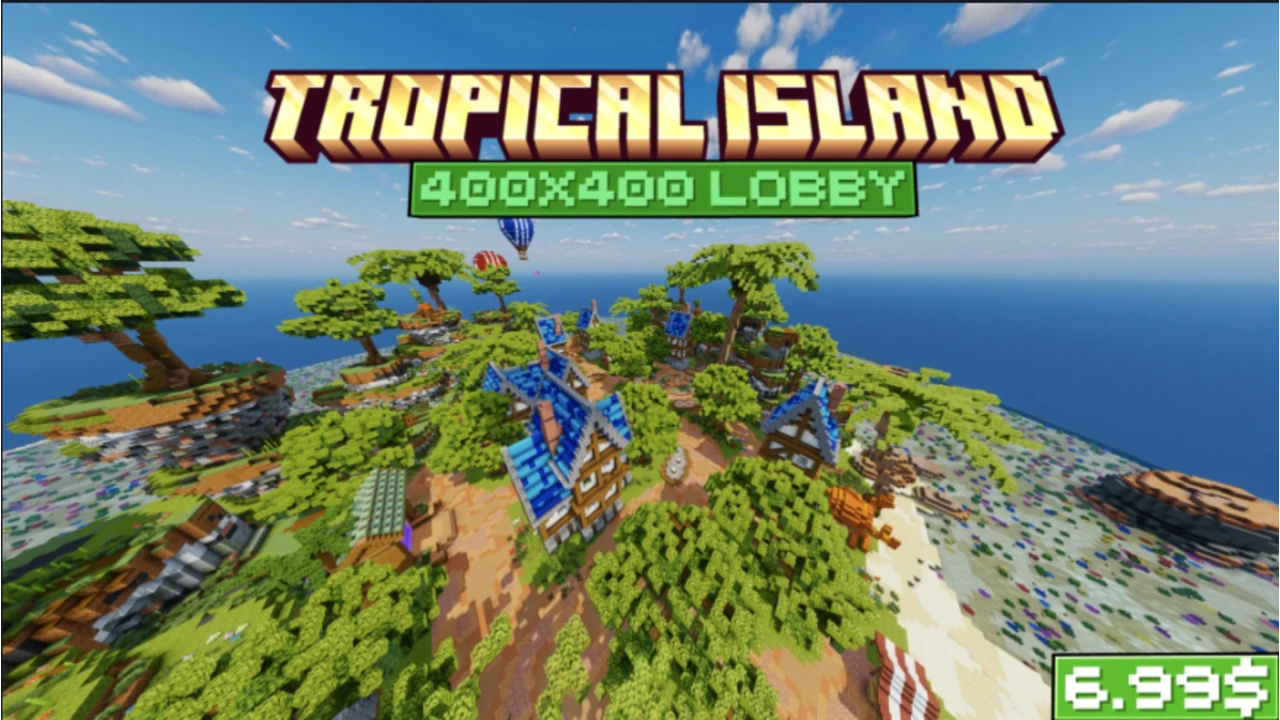
Explore the ZCraft Studios Tropical Island 400x400 Minecraft spawn, with a coastal village, blue-roofed houses, sandy beaches and a glowing portal.
Tropical Island Spawn 400x400: Coastal Fantasy Hub
Tropical Island is a handcrafted 400x400 Minecraft spawn built around a coastal village. Blue-roofed timber houses, sandy beaches, lush vegetation, market stalls and a glowing portal give the island a colorful fantasy setting for hubs and SMP worlds.
At a glance
| Details | |
|---|---|
| Resource type | Minecraft build — spawn and hub |
| Build size | 400 × 400 blocks |
| Build version | 1.0 |
| Listed Minecraft versions | 1.21.8, 1.21.11, 26.1, 26.2 and 26.3 |
| Download size | Approximately 7.75 MB |
| Dependencies | None listed in the product catalogue |
| Licence | See the current marketplace listing |
Explore the island
- Coastal village: timber-framed houses with blue rooftops, stone foundations and connected pathways.
- Village square: open gathering spaces and market stalls with room for NPCs, crates, information boards and server features.
- Island landscape: tropical trees, raised rocky terrain, dense greenery, sandy beaches and detailed coastal water.
- Decorative landmarks: two hot-air balloons, striped market canopies, gardens and a glowing purple portal.
Suitable server types
The island can serve as a Survival or SMP spawn, an RPG or adventure hub, a Towny community center, an island-themed lobby or a general multiplayer network hub.
Before importing
- Check the supported Minecraft versions against your target server build.
- Back up the current world before importing or replacing anything.
- Read the included README and inspect the archive to confirm its world format and import instructions.
- Test the map on a staging server first, then add your own NPCs, portals, crates and server information.
- Review the marketplace licence and attribution requirements before using the build publicly.
Import and setup workflow
Prepare a test server
Use a server version listed above and make a backup before changing any existing worlds.
Extract and inspect the download
Read the included README and identify the world folder and any accompanying files.
Import the world
Follow the instructions for your world-management setup. Do not guess the folder name or overwrite your current spawn.
Set and protect the spawn
Configure the spawn location, protect the intended build area and check player permissions.
Add server features
Place NPCs, portals, crates, leaderboards and information displays around the village square and other open areas.
Test with a regular player account
Check the spawn point, pathways, protection, interaction points and performance before opening the map to players.
Product listing
View Tropical Island Spawn 400x400 on BuiltByBit
For more world-import guidance, see Minecraft Build Guides and Installing a ZCraft Studios Resource. For help with your server setup, visit the ZCraft Studios Discord.